Claude: what Free, Pro, Max and Ultra include and cost
November 18, 2026
Claude is an AI service made by Anthropic. The headline on the claude.com home page reads "Ask what's next," and below it is a line about being a "thinking partner for big ambitions." (Both are translated from the Korean screen.) You can chat on the web, on desktop, and on mobile, and the paid plans include Claude Code too.
What the first screen shows
The home page at claude.com has "Continue with Google" and "Continue with email," so you need to sign up and log in before you can use it. claude.ai stopped at a security check screen, so we didn't try the service itself. Everything below comes from the official pricing page.
The first screen also has a "Download desktop app" button. Under the email button, a note says that by continuing you agree to Anthropic's privacy policy and agree to receive promotional emails and notifications.

What it costs
These prices come from the official claude.com pricing page as of November 18, 2026. They're in U.S. dollars, and the page says taxes aren't included. The Individual tab has four plans: Free, Pro, Max, and Ultra.
| Plan | Monthly | Per month, billed yearly | Billing |
|---|---|---|---|
| Free | $0 | n/a | n/a |
| Pro | $20 | $17 ($200 billed up front) | Monthly or yearly |
| Max | $100 | None | Monthly |
| Ultra | $200 | None | Monthly |
The $17 on the Pro card is the monthly rate with the annual subscription discount, and the card says $200 is billed up front. Pay month by month and it's $20. Max and Ultra are billed monthly only.
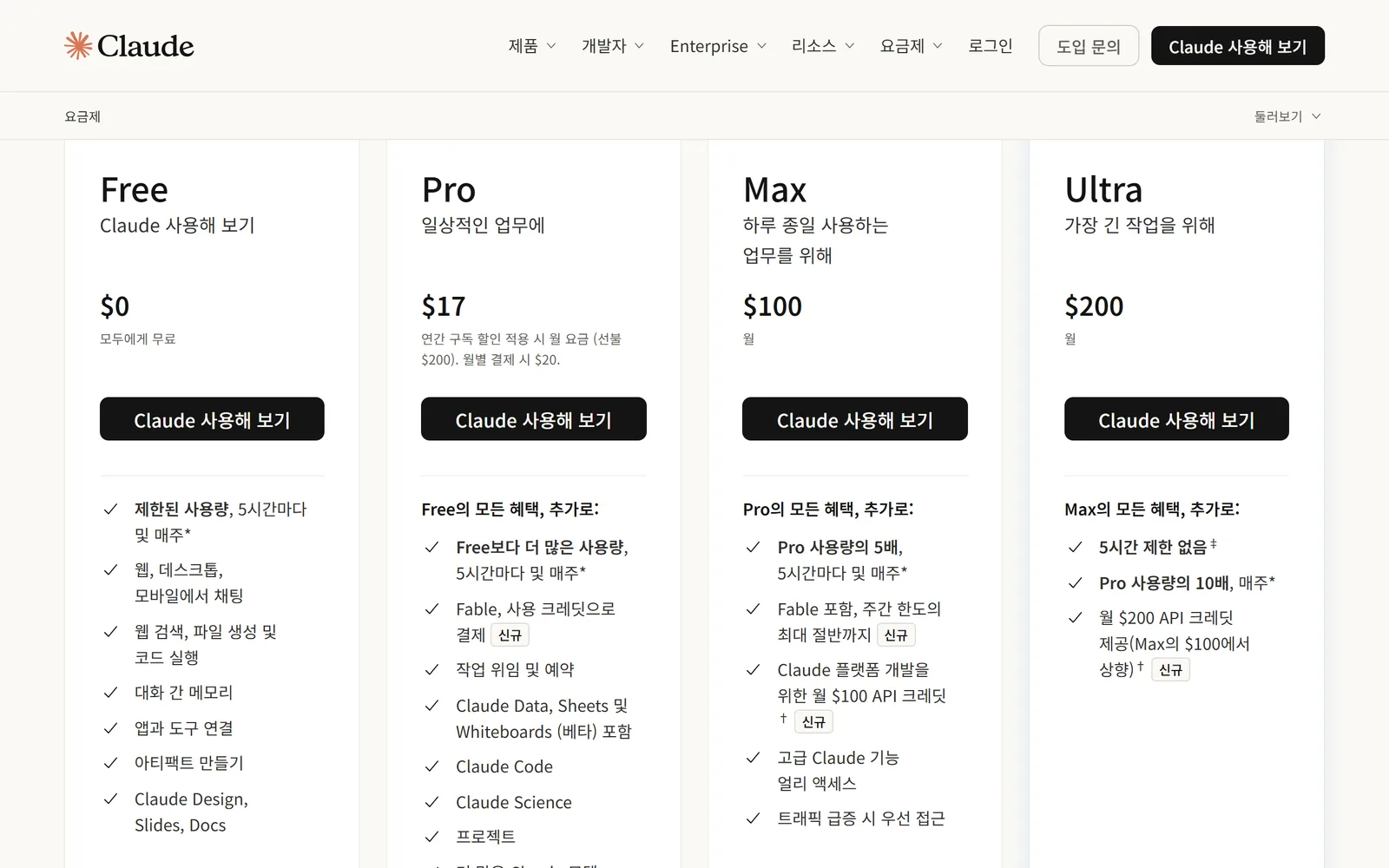
The Free card lists limited usage (every 5 hours and every week), chat on web, desktop, and mobile, web search, file creation and code execution, memory across conversations, connections to apps and tools, building artifacts, and Claude Design, Slides, and Docs. The page's own FAQ says Free is enough for everyday questions.
Pro includes everything in Free, plus more usage, delegating and scheduling tasks, Claude Code, Claude Science, projects, more Claude models, and using Claude in Chrome and Microsoft 365. Max adds 5x Pro's usage, $100 a month in API credits (for building on the Claude platform), early access to advanced features, and priority access when traffic spikes. Ultra includes everything in Max, with no 5-hour limit, 10x Pro's weekly usage, and $200 a month in API credits. A footnote says the lack of a 5-hour limit applies to verified accounts.
Models differ by plan. This is the "Models and usage" section of the comparison table, translated.
| Model | Free | Pro | Max | Ultra |
|---|---|---|---|---|
| Fable | No | Usage credits | 50% of weekly limit | 50% of weekly limit |
| Opus | No | Yes | Yes | Yes |
| Sonnet | Yes | Yes | Yes | Yes |
| Haiku | Yes | Yes | Yes | Yes |
The page's FAQ calls Fable its top model. Max and Ultra can use it for up to half the weekly limit, and on Pro you pay for it with usage credits.
How the usage limits work
Here's how the FAQ explains it. Every plan has usage limits. Most accounts have a rolling session limit that resets every 5 hours, and paid plans add a weekly limit. The Free card, though, says "every 5 hours and every week," so the two descriptions don't quite match.
Activity on web, desktop, mobile, and Claude Code all counts against the same pool of usage. How much you get depends on how long and complex the conversation is, which model you pick, and which features you use, so there's no fixed number of messages. The footnote on the pricing cards also says how fast you hit the limit depends on the model, conversation length, and file size.
The multipliers read like this. Pro gives at least 5x the usage of Free per 5-hour session. Max gives 5x Pro, every 5 hours and every week. Ultra gives 10x Pro's weekly usage, and verified accounts have no 5-hour limit. The page also says that, to keep access fair for everyone, extra weekly or monthly limits, or limits on models and features, may be added.
When you hit a limit, you have three options: wait for the reset, switch to a higher plan, or, on a paid plan, turn on usage credits and keep going at standard API rates. The page says you can see your current usage under Settings, then Usage.
How far to go before paying
Going by the FAQ, try Free first and see whether everyday questions get answered. If you start hitting the limit often, that's when to look at Pro.
What starts with Pro is Claude Code, projects, delegating and scheduling tasks, and more Claude models (Opus, in the comparison table). Max and Ultra, the FAQ says, are for people who work with Claude all day and want longer sessions without interruption. They include everything in Pro, plus more usage. If you don't hit the limit often, you could start on Pro, check how much you use in Settings, and decide from there.
How to use it well
The prices are in dollars and don't include tax, so check the actual amount on the checkout screen.
Yearly billing exists only on Pro. You pay $200 up front. Twelve months at $20 would come to $240, so compare the two before you choose.
Activity on web, desktop, mobile, and Claude Code draws from the same pool. Check what's left under Settings, then Usage.
Sources (checked November 18, 2026)
- Claude: the first screen, sign-up and login notes
- Claude pricing: prices and features by plan, the models and usage comparison table, billing options, FAQ