Cursor: which plan to pick for coding, and what it costs
November 12, 2026
Cursor is an AI agent you hand coding work to. The home page headline reads, in Korean, "Cursor is your coding agent for building bold software." It says you can focus on decisions while the agent turns ideas into code. The page says the agent uses its own computer to build a feature from start to finish, test it, and run a demo so you can review it. It also says Cursor runs in the terminal, works with your team in Slack, and reviews pull requests (PRs) on GitHub.
This was written without trying it
We didn't use Cursor for this post. Cursor is a program you download and install, and the buttons on the home page are "Download for Windows" and "Request a demo." The web version of the agent sends you to a login screen. Everything below comes from what the official home page and pricing page say.
What you can see before signing up
The Korean home page, cursor.com/ko, opens without a login, and its text is in Korean. Further down, demos of Cursor Desktop and Cursor CLI play on their own. Those are examples Cursor shows, not results from our own use. The input box in the demo reads, in Korean, "Use / for commands · use @ for files."
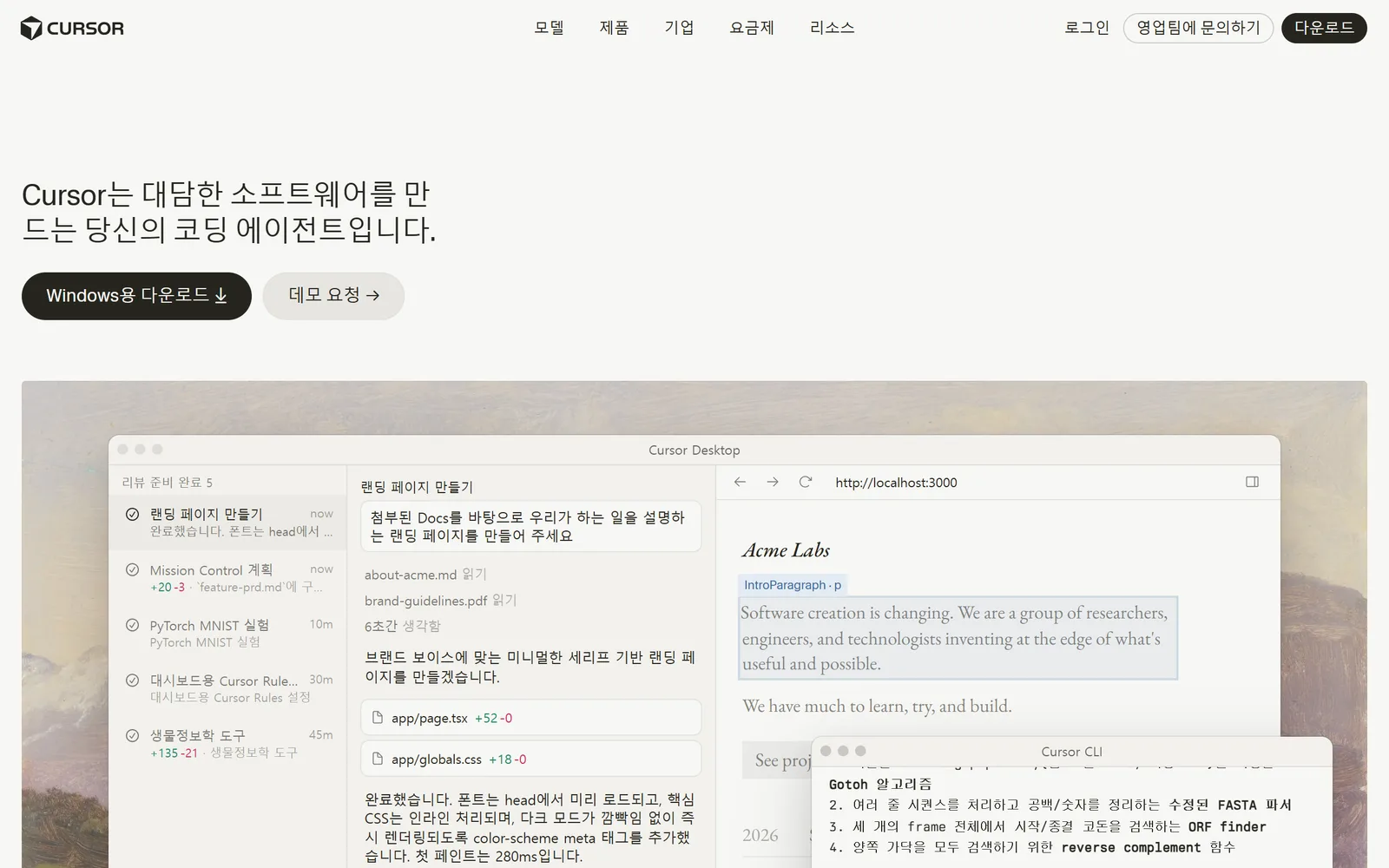
The home page makes a few more claims. Agents run in parallel, and you can run a group of agents that take on ambitious tasks for hours or even days. You pick a model from the frontier models of OpenAI, Anthropic, Gemini, SpaceXAI, and Cursor. It also describes a bot that logs in to your tools, uses them as you would, and brings back finished work. The page calls it the Grok bot.
What it costs
These are the prices on the official pricing page as of November 12, 2026. They're in US dollars. The page has "Individual" and "Teams" tabs. There's no button to switch between monthly and yearly billing, and every price on the cards is a monthly price.
| Plan | Per month | Usage (comparison table wording) |
|---|---|---|
| Free | $0 | Limited |
| Plus | $8 | Base |
| Premium | $30 | 4x Plus |
| Super | $100 | 15x Plus |
| Ultra | $200 | 50x Plus |
| Teams | From $30 per user | 4-50x Plus |
Ultra isn't on a pricing card. It appears only in the plan comparison table lower on the page. The comparison table lists Teams as "$30+/user/month," and inside the Teams card you choose a seat type from Premium, Super, and Ultra. Switching seat types didn't change the $30 shown on the card. The enterprise plan shows "Custom" for the price and works through contacting sales.
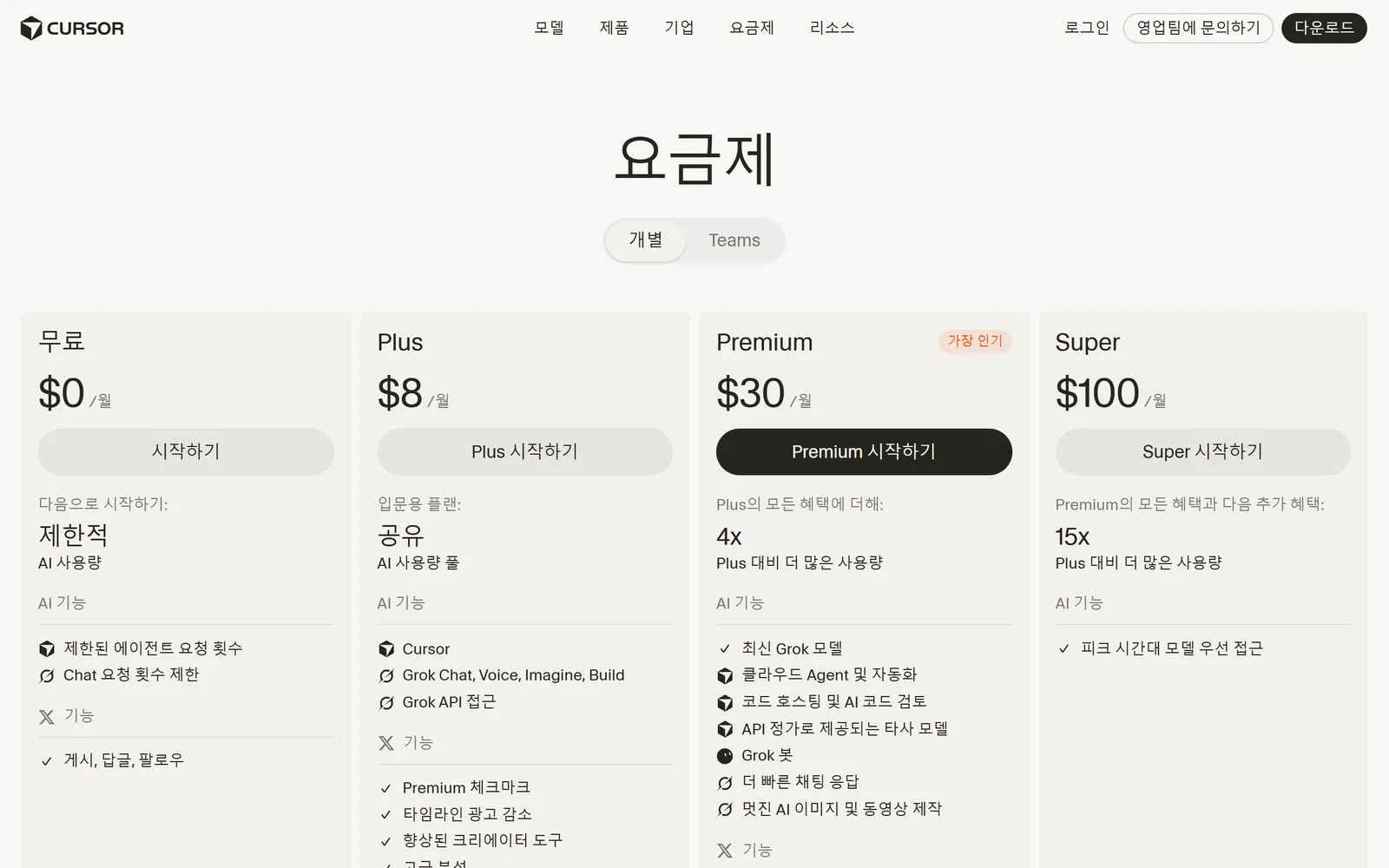
The sentence under the cards says the displayed prices don't include applicable taxes such as VAT, and the FAQ also says all prices are exclusive of tax. You can cancel anytime, but to avoid extra charges you have to cancel at least 24 hours before the renewal date. The page says prices may change.
What's bundled into the plans
This isn't a page that sells only Cursor. Each card lists AI features and X features together.
- Free: a limited number of agent requests and Chat requests, plus posting, replying, and following on X
- Plus ($8): Cursor, Grok Chat, Voice, Imagine, and Build, and Grok API access. On the X side: a Premium checkmark, fewer ads in your timeline, improved creator tools, and advanced analytics
- Premium ($30): everything in Plus, 4x the usage of Plus, the latest Grok models, cloud agents and automation, code hosting and AI code review, third-party models at API list prices, the Grok bot, faster chat responses, and AI image and video creation. On the X side: scrolling without ads on most screens, a preferred @handle, and a higher reply boost
- Super ($100): everything in Premium, 15x the usage of Plus, and priority model access during peak hours
- Ultra ($200, comparison table): 50x the usage of Plus and top priority access to all products and models
The pricing page also says who sells the subscription. Its FAQ says subscriptions are sold directly only by X Subscription Corp., and that it doesn't recognize any reseller or third-party seller as official. The home page footer links to "SpaceXSI subscription terms" and "Grok bot terms of use." So this isn't the price of one coding tool. X and Grok benefits are mixed into the same price. If you're buying for coding, treat the X perks as something that comes along with the price, and look at the model rules below first.
Which plan for coding
The things to go by are which models you can use and how much usage you get.
Models split like this. Plus includes only Grok models. Third-party models such as those from OpenAI or Anthropic are available on Premium and above, but with no built-in usage. You pay for what you use at API list prices, separately. The page says you can set a spending limit to manage the charges. Grok API access is also included in paid plans, but its usage is billed separately at standard model rates and doesn't come out of the usage pool included in your plan.
Usage is a pool shared by Cursor and Grok. The pool is also used for Grok's Chat, Imagine, Voice, and Bot, and higher plans get a bigger one. Limits refresh weekly, so heavy use in one day doesn't burn through a whole month at once, according to the page. When you run out, you can keep going with an extra top-up or wait for the refresh, and you can check what's left in settings.
The pricing page makes its own recommendations. Premium for people new to AI, Super for people who use agents every day, and Ultra for heavy power users. For social media creators with light AI use, it recommends Plus. Professionals collaborating with others get Teams, and large organizations that need invoicing, shared usage, or advanced security get the enterprise plan.
In the comparison table, cloud agents and automation, code hosting, AI code review, and third-party models start at Premium. For coding, Plus is an entry plan that uses only Grok models. If you want third-party models or cloud agents, Premium is where you start.
How far to try it before paying
What you can see without signing up is the home page and the pricing page. To try it, you have to download the program. There's a Free plan, so a first try goes on Free. The page says Free has limited agent requests and Chat requests. Work within that limit and see whether your tasks run, then decide whether to move up.
Two things matter when you move up: whether you need third-party models, and how much you run agents in a day. If you don't need third-party models, first check whether the Grok models on Plus are enough. If you do, Premium is the starting point, and that usage is charged on top of the monthly price. If you'll use agents every day, the pricing page recommends Super.
Three things to watch
Don't work out a month's cost from the monthly price on the card alone. Third-party model usage isn't included in the monthly price, and tax is extra. If you pick Premium at $30 and use third-party models, both get added on top.
You have to cancel at least 24 hours before renewal. If you move up to a paid plan just to try it, put the renewal date on your calendar.
Buy the subscription only on the official website. The pricing page says a subscription bought any other way isn't a legitimate one, and the account can be suspended or terminated.
Sources (checked November 12, 2026)
- Cursor: home page
- Cursor pricing: individual and Teams prices, plan comparison table, FAQ