Runway makes video, images, and audio: free tier and prices
November 4, 2026
Runway is a service for making and editing video, images, and audio. Its Korean home page runs the headline "The start of Real-World Intelligence" (shown in Korean on the page) and says the company is building intelligence that can understand, simulate, and act in the world. The platform built on top of that comes in three parts: Runway Creative, a studio for making things, Runway Dev for developers, and Runway Robotics for robots. This post covers Creative. For Creative, the company says more than 60 million creators use it worldwide, and it describes its video model Gen-4.5 as the best video model in the world.

Text went in, and Enter was pressed
The start button on the home page (labeled "Try Runway" on the English version) opened a guest screen at app.runwayml.com with no login. In the middle sat the heading "What will you create today?" and an input box. Below the box were buttons named things like "Seedance 2.5" and "GPT Image 2." The left side had menus such as "Agent," "Tool," "Apps," and "Workflows," and the top right had "Login" and "Sign up." The screen was in English.
The prompt typed into the box was a Korean sentence meaning "A single paper boat floating in a puddle on a morning after the rain. Soft morning light, short video." After Enter, the screen switched to "What should we build with Agent?" and a window opened in the middle. It read "Your generation is one step away," and below that, "Sign up for free and get 500 credits, no card required." No account was created.
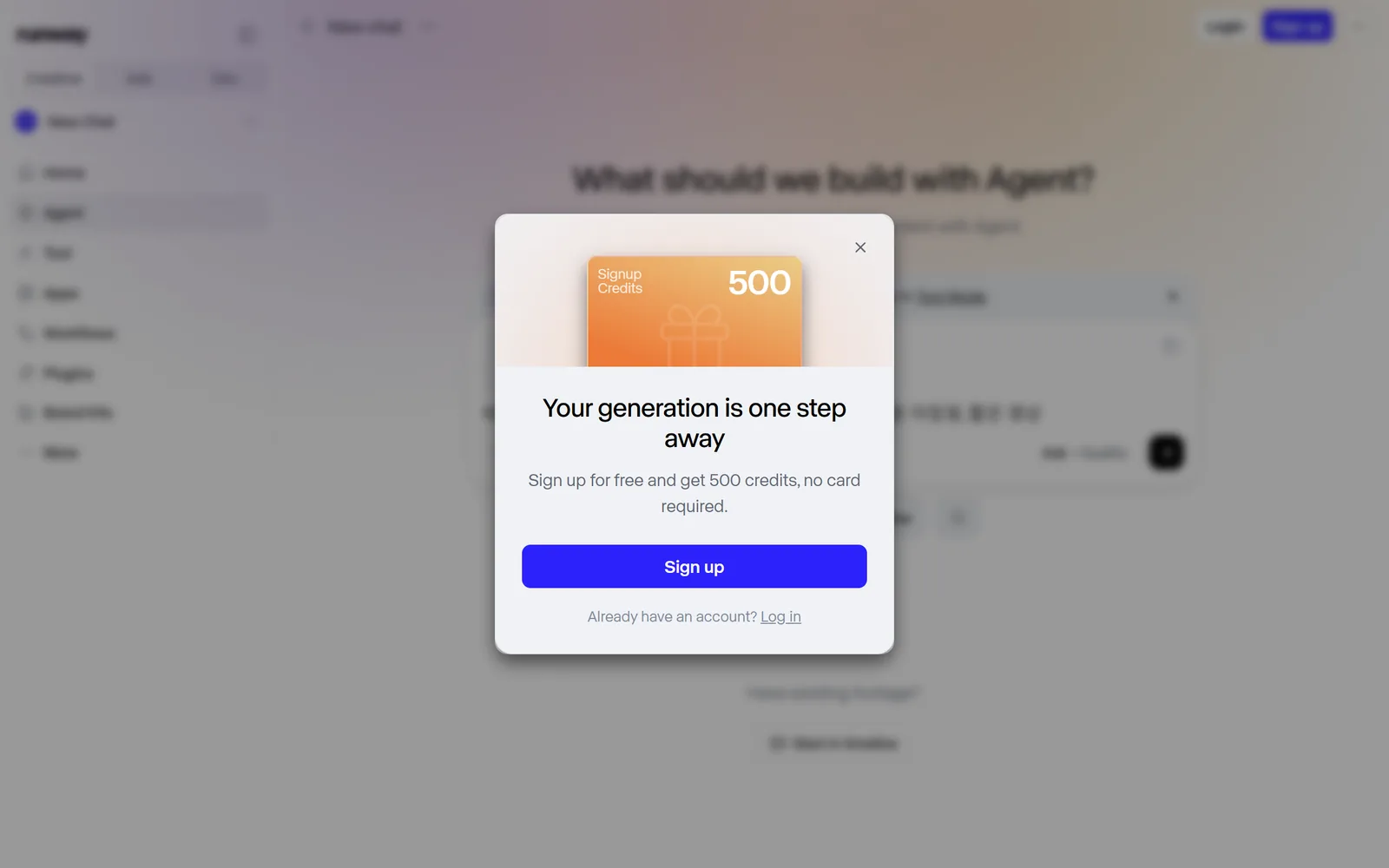
The sign-up window says "500 credits." The Free card on the pricing page says "125 credits (provided once)" (shown in Korean on the page). The two screens show different numbers.
What it costs
These are the prices on the official Korean pricing page as of November 4, 2026. They are on the Individual tab and shown in US dollars. The page opens with yearly billing selected, and the yearly side says "20% off." With yearly billing selected, the monthly price appears struck through next to the lower one (Standard shows $12 beside $15).
| Plan | Monthly | Per month, billed yearly | Per year | Credits per month |
|---|---|---|---|---|
| Free | Free | Free | Free | 125 (once) |
| Standard | $15 | $12 | $144 | 625 |
| Pro | $35 | $28 | $336 | 2,250 |
| Max | $95 | $76 | $912 | 9,500 |
The Per year column is not on the official page. It is the yearly-billing monthly price multiplied by 12, worked out for this post. The page's savings notes ("save $36 a year" on Standard, "$84" on Pro, "$228" on Max) match the difference between twelve months at the monthly price and this yearly total.
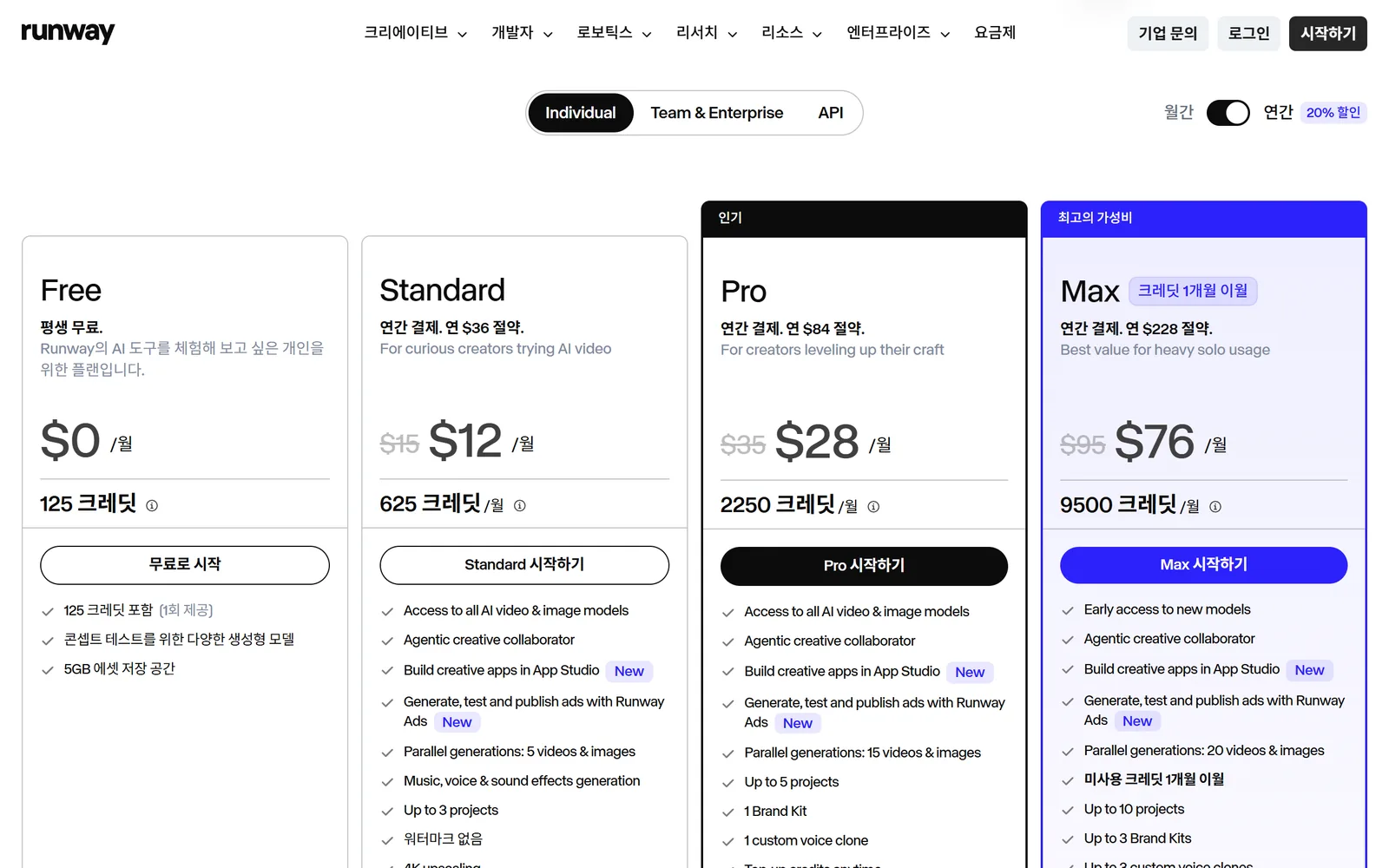
On the cards, Free carries "Free forever," Pro has a "Popular" band, and Max has a "Best value" band. The Max card lists a one-month credit rollover, and a "No watermark" line starts at the Standard card. The Team & Enterprise tab on the same page shows a Team plan for 2 or more users at $69 per user per month on monthly billing. Enterprise is handled by contacting sales.
How many seconds and images the credits make
The page's FAQ describes credits as the unit used when generating images, video, and audio. The credits a single generation costs depend on the model, length, and resolution. As an example, Gen-4.5 uses 12 credits per second of video. The paid plan cards say how much the monthly credits can produce.
| Plan | Gen-4.5 video | Gen-4 images (1080p) |
|---|---|---|
| Standard | 52 seconds | 78 |
| Pro | 187 seconds | 281 |
| Max | 791 seconds | 1,187 |
The amount varies a lot by model. In the model comparison table on the same page, Standard's 625 credits a month make ten 5-second Gen-4.5 videos, or 312 Gen-4 Image Turbo images. Monthly credits on Standard and Pro do not roll over and reset within 24 hours of each billing date, while on Max, unused credits carry over to the next month for up to one month's worth. More credits can be bought at any time, with a minimum purchase of 1,000 credits. The page says extra credits bought separately do not expire.
Where to stop using free and start paying
The guest screen opened as far as the input box, and pressing Enter in it brought up the sign-up window. The pricing page lists the Free credits as provided once. The FAQ says Free gets a one-time grant of 125 credits that do not expire. It is not a monthly refill.
Before paying, count the length that will be needed. Gen-4.5 costs 12 credits per second, so a 5-second video is 60 credits. Ten 5-second videos a month fit inside Standard's 625 credits. Past that, Pro or Max comes into view. For image work, the credits per image run from 2 to 20 depending on the model, so the price of the model in use is the thing to check first.
Getting more out of it
The yearly toggle is on by default. Standard is $15 on monthly billing, and the $12 shown when the pricing page first opens is the monthly figure for yearly payment. For a one-month trial, switch to monthly and use $15 as the baseline.
The same credits go further or less far depending on the model. The seconds and image counts on the plan cards are for Gen-4.5 for video and Gen-4 for images, so the comparison table is where to look up the credits for the model actually planned.
Credits don't roll over on Standard or Pro, so a month's usage is worth estimating up front. Among the individual plans, Max is the only one that carries unused credits forward.
Sources (checked November 4, 2026)
- Runway: home page and product overview
- Runway pricing: plan prices, credits, model comparison table, FAQ
- Runway app guest screen: guest screen and sign-up window