targetSdk 36 deadline passed: the Play Console extension
August 25, 2026
* This applies if you publish Android apps.
What targetSdk is
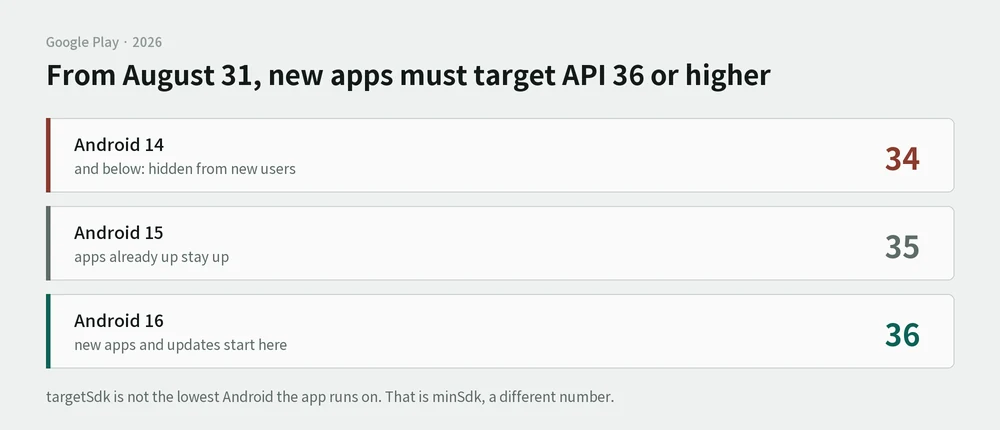
Android ships a new version every year, and the rules change with it. How you ask for location, whether a notification needs permission first, how much of the screen you can use.
If every old app broke each time, that would be a problem. So Android has each app declare one thing: "I was built against the rules of this year." That number is targetSdk. The phone reads it and applies that era's rules to that app. It's why an old app still runs on a new phone.
It works like the year a building was completed. Fire codes change, but existing buildings aren't torn down over it. They're judged by the code in force when they went up. New construction follows the new code.
The number is a running count, not a version name. Android 14 is 34, 15 is 35, 16 is 36.
targetSdk is not the minimum Android an app runs on. That's a separate number called minSdk. Raising targetSdk to 36 does not drop support for older phones.
The deadline
| Starting | August 31, 2026 |
| Applies to | New apps and app updates |
| Requirement | Target Android 16 (API 36) or higher |
| Apps already published | Stay up at API 35 or higher |
| Apps at 34 or below | Hidden from new users on phones running a higher Android |
An extension through November 1 can be requested. The form is set to open in Play Console later in the year.
Why two lines isn't the whole job
The change itself is two lines in a config file. But from API 35, drawing edge to edge is mandatory. Raise the number alone and the app's title slides under the status bar.
- It doesn't show on a desktop screen. Only a real device reveals it
- The space taken by the status bar and the gesture bar has to be reserved in code
- Cost: about 30 minutes of code. Device testing is separate
- Source: Meet Google Play's target API level requirement
One more layer for wrapped web apps
If a web view is wrapped into an app (Capacitor and similar), the wrapper's version matters too. Android 16 changed how system bar insets behave, and older wrapper versions don't account for it.
- Trap:
env(safe-area-inset)reads as 0 in the Android WebView. If spacing depends on that value, the layout slides under the status bar - Source: Capacitor 8 migration guide
What's been verified
| Hit directly | The layout sliding under the status bar after raising the number. Only a device showed it |
| From documentation only | The extension request process |