Fixing text that breaks when you paste it
Text you pasted usually goes wrong for one of three reasons: curly quotes, doubled spaces, and line breaks that came along from wherever you copied it.
It looks fine to you. Then search doesn't find it, and Word chops the sentences into pieces.
One: the quotes aren't straight
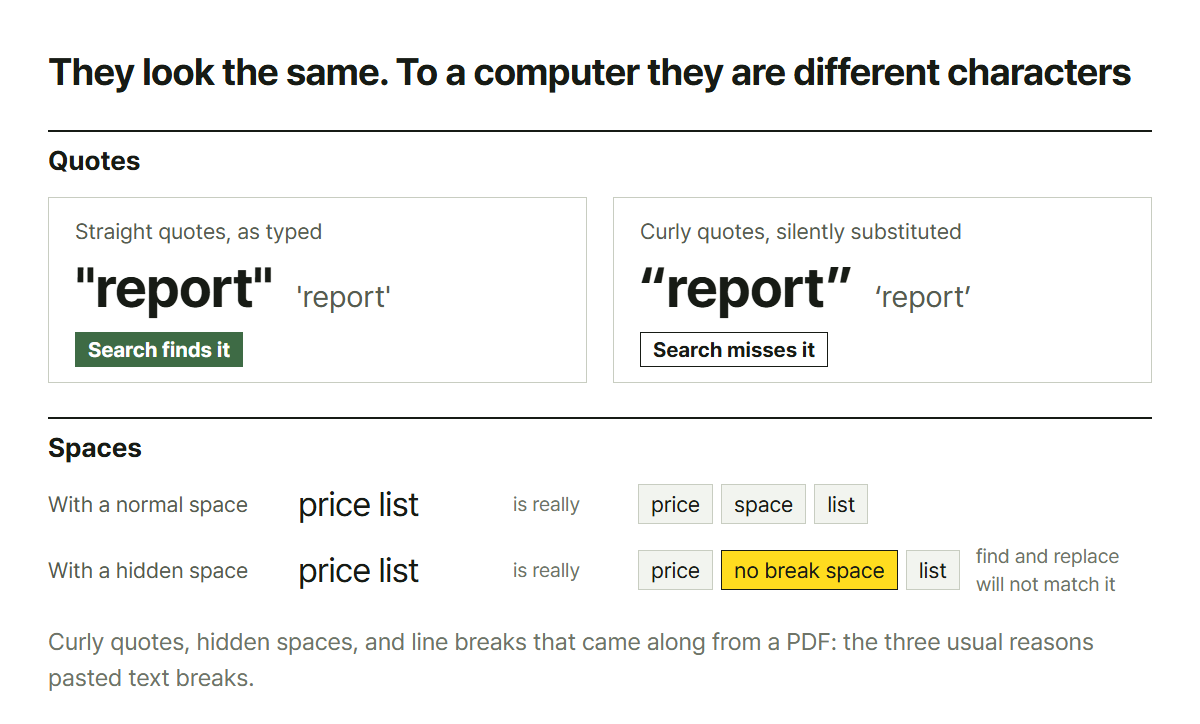
The quote you type on a keyboard is a "straight" one. The quote a word processor silently substitutes is a "curly" one. They look nearly identical and are, to a computer, entirely different characters.
Which produces this:
- Paste it into a search box and nothing is found
- Put it in code or a config file and it errors
- Excel refuses to read it as part of a formula
Apostrophes do the same thing, and a hyphen (-) quietly replaced by an em dash (—) is the same class of problem.
Two: spaces you can't see
There are characters that look like a space and are not: the non-breaking space, the zero-width space, and friends. Copy anything off the web and they come with it.
The symptom is peculiar: you delete them and nothing happens. Backspace just moves the cursor, and find-and-replace with a space typed in the box doesn't match. Of course it doesn't: it's a different character.
Doubled spaces belong here too. Two or three spaces between sentences make alignment go subtly off.
Three: line breaks from a PDF
This is the worst of them.
A PDF imitates paper, so there is a real line break at the end of every line as it appeared on the page. What your eye reads as one paragraph is, as data, ten separate lines.
Paste that into a document and the sentences break in strange places, because the new column is a different width and the old break positions mean nothing. To join it back up you have to remove the line breaks, but keep the real ones between paragraphs. Remove them all and the whole thing becomes one block.
Doing it by hand
Find-and-replace does work. Curly quotes to straight, double spaces to single, line breaks to spaces. The problem is doing three passes every time, and the third one takes your paragraph breaks with it, so you end up splitting them again by hand.
Spelling is a different job
A line worth drawing: mechanical cleanup and spell checking are not the same task.
The three things above follow clear rules, so a program handles them reliably. Spelling needs to know what the sentence means. Nothing about the characters in their and there tells you which one belongs in a sentence: that takes a dictionary and grammar analysis, not a rule.
So this cleans up what is mechanical and leaves spelling alone. If you need a spell check, use a proper checker.
What this does not cover
- Text with broken encoding: if you're seeing characters like
占쏙옙, that is a different
problem. Cleanup cannot fix it; you need the original again
- Tables that came along: a table is structure rather than text and rarely survives a paste
- Grammar and style editing
Paste it in, press the button, and all three get handled in one pass: quotes straightened, runs of spaces collapsed, stray line breaks joined while the paragraph breaks stay.
Clean text is left alone. If there is nothing to fix, what comes out is what went in.