Five ways to put AI in an app
August 25, 2026
* Prices are as of August 2026.
The five
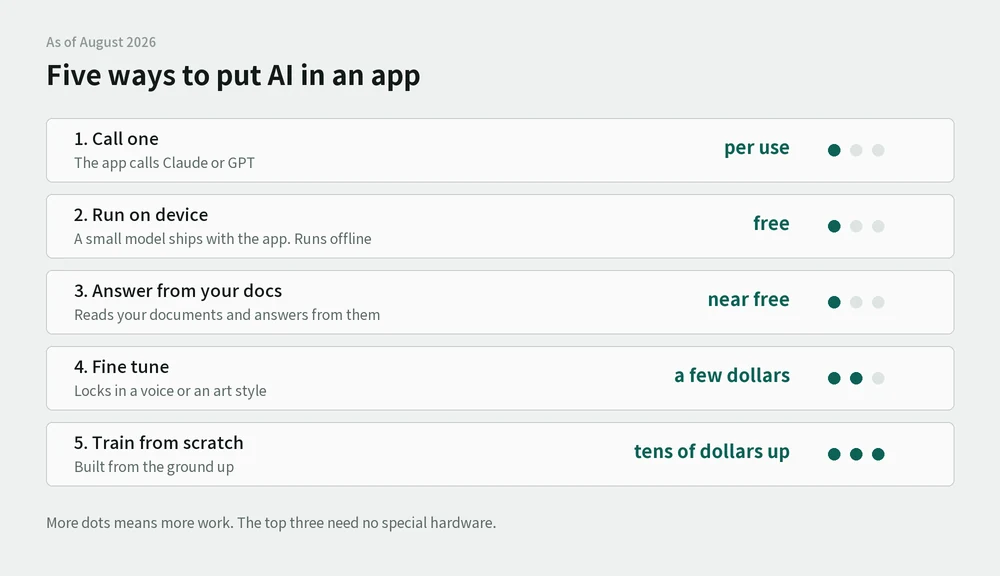
| What it is | Cost | |
|---|---|---|
| 1. Call an API | The app asks Claude or GPT and gets an answer back | Per use. Cents at a time |
| 2. Run it on the phone | A small model ships inside the app. Works offline | Free |
| 3. Answer from your own documents (RAG) | The model reads your files and answers from them | Close to free |
| 4. Fine-tune (LoRA) | Lock in a voice or an art style | A few GPU hours. Single-digit dollars |
| 5. Train from scratch | Build the model yourself | Tens of dollars for small ones. Large language models are out of reach |
It gets harder going down the list. The first three need no special hardware.
1. Call an API
The app goes through a server, asks the model, and gets an answer. Most apps that carry the word "AI" today are doing this.
- Blocker: user data leaves the device. Your privacy policy has to say so
- Blocker: the API key can't sit inside the app. You need a relay server
- Cost scales with usage. On a free app, more users means a bigger bill
2. Run it on the phone
A small model ships with the app. It works without a connection and nothing leaves the device.
If an app's selling point is "your data never leaves your phone," this is the only way to add AI without breaking that promise. It matters most for apps that use the camera or the microphone.
- Cost: free
- Blocker: the app gets a few hundred megabytes heavier
- Blocker: large models don't fit, so the ceiling is whatever does
3. Answer from your own documents (RAG)
The model isn't touched. When a question comes in, the relevant passages are pulled from your files and sent along with it, and the model answers from those.
- Cost: close to free
- Good for: anywhere there are hundreds of documents. Internal notes, product docs, policies
- Blocker: the documents have to be split and indexed first
4. Fine-tune (LoRA)
An existing model is fed more material until it settles into a particular voice or art style. In image work, LoRA is the common form of this.
- Cost: a few GPU hours, which is single-digit dollars at the rates below
- Blocker: it needs a GPU, which can be rented
Renting a GPU
Not owning a graphics card is the wall from step 4 onward. GPUs rent by the hour, billed by the second, so ten minutes costs ten minutes.
There are three places to rent from, and the prices differ a lot.
| Where | What it is | RTX 4090 per hour |
|---|---|---|
| From individuals | Marketplaces for idle cards (vast.ai, RunPod Community) | about $0.34 |
| GPU-focused clouds | Data centers the provider vetted (RunPod Secure, Lambda) | about $0.69 |
| Big clouds | AWS, Google Cloud | More, plus quota approval |
Larger cards like the A100 start around $1.39 an hour.
What renting from individuals means
Gamers, miners, and small labs list their cards when they aren't using them. Vast.ai carries roughly 17,000 GPUs from more than 1,400 independent providers.
The platform sits in the middle and handles payment and an isolated container, so code runs on someone else's machine without touching their files. Hosts carry reliability scores, and accepting "the host can interrupt this" cuts the price by up to half.
- Blocker: cheap instances do get interrupted. Long jobs need checkpoints
- Blocker: it's someone else's machine. Not the place for sensitive material
What the price means
Rendering a thousand images overnight, or locking in one art style, becomes a single-digit dollar job. That's different arithmetic from services that charge credits per image.
- Blocker: it's hands-on. Picking models, configuring, and the trial and error are all yours
- For a handful of drafts, a paid service is faster. Renting wins at volume
- Sources: RunPod RTX 4090 pricing · vast.ai
5. Train from scratch
Building a large language model from nothing is out of reach for an individual. Small ones are not. A narrow model for classification or recommendation trains for tens of dollars if the data exists.
- Blocker: the data has to exist. Gathering it takes longer than the training does
What's been verified
| Actually run | Local speech recognition and speech synthesis from step 2. A three-second Korean clip transcribed in 2.1 seconds, no GPU |
| Prices and conditions checked only | Steps 1, 3, 4, 5 and the GPU rental rates |