16:9 height from any width
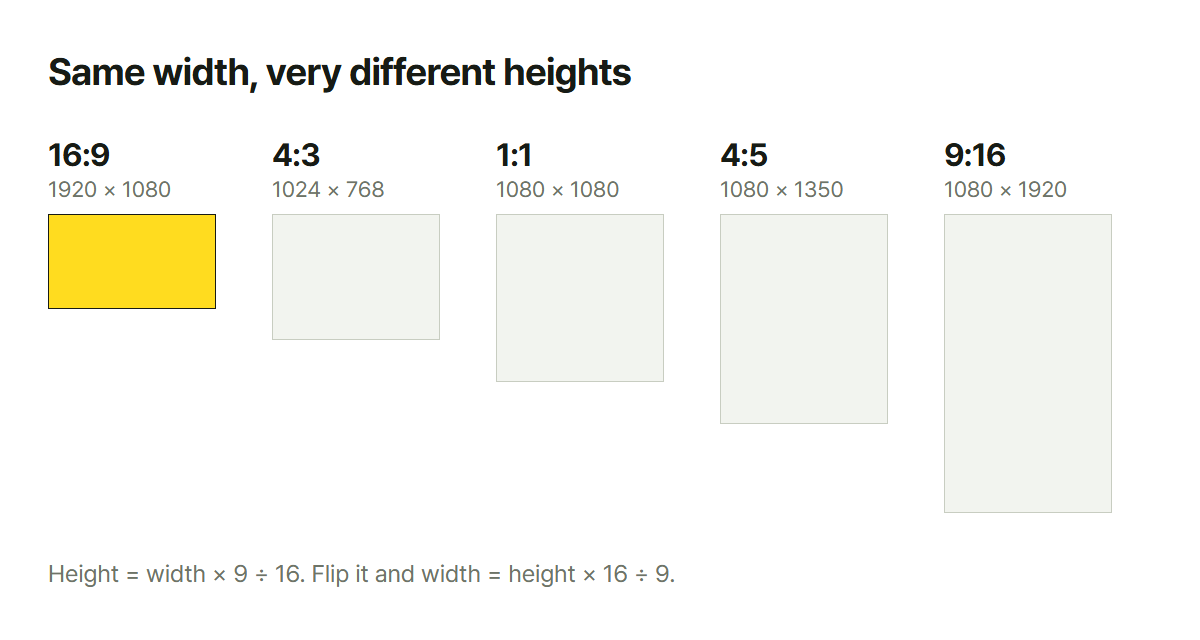
The height for 16:9 is width × 9 ÷ 16. One division.
1920 × 9 ÷ 16 = 1080
1280 × 9 ÷ 16 = 720
That's the whole thing. The trouble starts when the width is 1440 or 2560: a number you haven't memorized.
Going the other way, from a height to a width, flip it: height × 16 ÷ 9.
Pairs worth recognizing rather than memorizing
| Used for | Size | Ratio |
|---|---|---|
| YouTube video and thumbnail | 1920×1080 · 1280×720 | 16:9 |
| 4K video | 3840×2160 | 16:9 |
| Instagram square | 1080×1080 | 1:1 |
| Reels, Shorts, TikTok | 1080×1920 | 9:16 |
| Instagram portrait | 1080×1350 | 4:5 |
| Older monitors and photos | 1024×768 · 4000×3000 | 4:3 |
| Digital camera photos | 6000×4000 | 3:2 |
Vertical video (9:16) is just 16:9 tipped over. Swap the two numbers.
Why it keeps going wrong
Here is the real problem. When the source ratio and the target ratio differ, you have to give something up.
A camera photo is usually 3:2 or 4:3. Put that into a 16:9 thumbnail and:
- Fill the frame and the top and bottom get cut
- Fit the whole thing and you get bars down the sides
There's no way to have neither. Stretching isn't an option: a face goes wide and everyone can see it immediately.
If you have to crop, what goes first
| Photo | Give up first |
|---|---|
| A person | The space above the head. Most amateur shots leave far too much of it, and cropping there costs nothing |
| Landscape | Sky. If the clouds are not telling a story, half of it can go |
| An object | Evenly on all sides. An object needs to sit in the middle to read as the subject |
| A document or screenshot | Do not crop. Add bars instead: one clipped character makes it useless |
A thumbnail is seen very small
You build it at 1280×720, but people see it thumbnail-sized in a list on a phone. That decides things like:
- Make the text big. If it looks small on your screen, it's already too late
- Five words at most
- If there is a face, give it a third of the frame
Shrink your image to 200 pixels wide and you'll see exactly what they will see.
What this does not cover
- Title-safe areas in video: broadcast crops the edges, so there are separate rules for keeping
important things inside
- Phone screens that are not 9:16: current phones are longer, around 19.5:9, so a 9:16 export
leaves a little over or gets trimmed
- Print ratios: that is the paper size guide
Width goes in, height comes out. 16:9, 4:3, 3:2, 1:1 and 9:16 are preset, and anything else you can enter by hand.
Cropping is a separate job, and it happens in the image board. Paste a photo there, lock the ratio, and the crop holds it while you drag. Worth having both open if a photo is waiting.