How many pixels is A4? Paper sizes × resolution
A4 is 2480 pixels. A4 is also 595 pixels. Both answers are correct: you just have not said what resolution you're working at yet.
210×297mm never changes. What changes is how finely you slice it. At 300dpi you cut one inch into 300 pieces; at 72dpi, into 72.
Choosing between 72, 150 and 300
| dpi | For | Why |
|---|---|---|
| 72 | Screen only | Images for the web, email attachments. Going higher only makes the file heavier |
| 150 | Office or home printer | Documents, tables, a copy to check. Unless it is a photograph you'll not see the difference |
| 300 | Sending to a print shop | Business cards, flyers, posters. Things people hold up close |
The dividing line is whether it ends up in someone's hand. A business card sits 30cm from the eye and needs 300; a poster on a wall is seen from across the room and 150 will do.
The table
Width × height in pixels. Rotate the two numbers for landscape.
| Size | mm | 300dpi | 150dpi | 72dpi |
|---|---|---|---|---|
| A3 | 297×420 | 3508×4961 | 1754×2480 | 842×1191 |
| A4 | 210×297 | 2480×3508 | 1240×1754 | 595×842 |
| A5 | 148×210 | 1748×2480 | 874×1240 | 420×595 |
| B5 | 176×250 | 2079×2953 | 1039×1476 | 499×709 |
| Business card | 90×50 | 1063×591 | 531×295 | 255×142 |
| Postcard | 148×100 | 1748×1181 | 874×591 | 420×283 |
One note on the card row: 90×50mm is the Korean and European size. A US business card is 3.5×2in (89×51mm): a millimeter narrower and a millimeter taller. Close enough that you won't notice it in your hand, far enough that a print shop will.
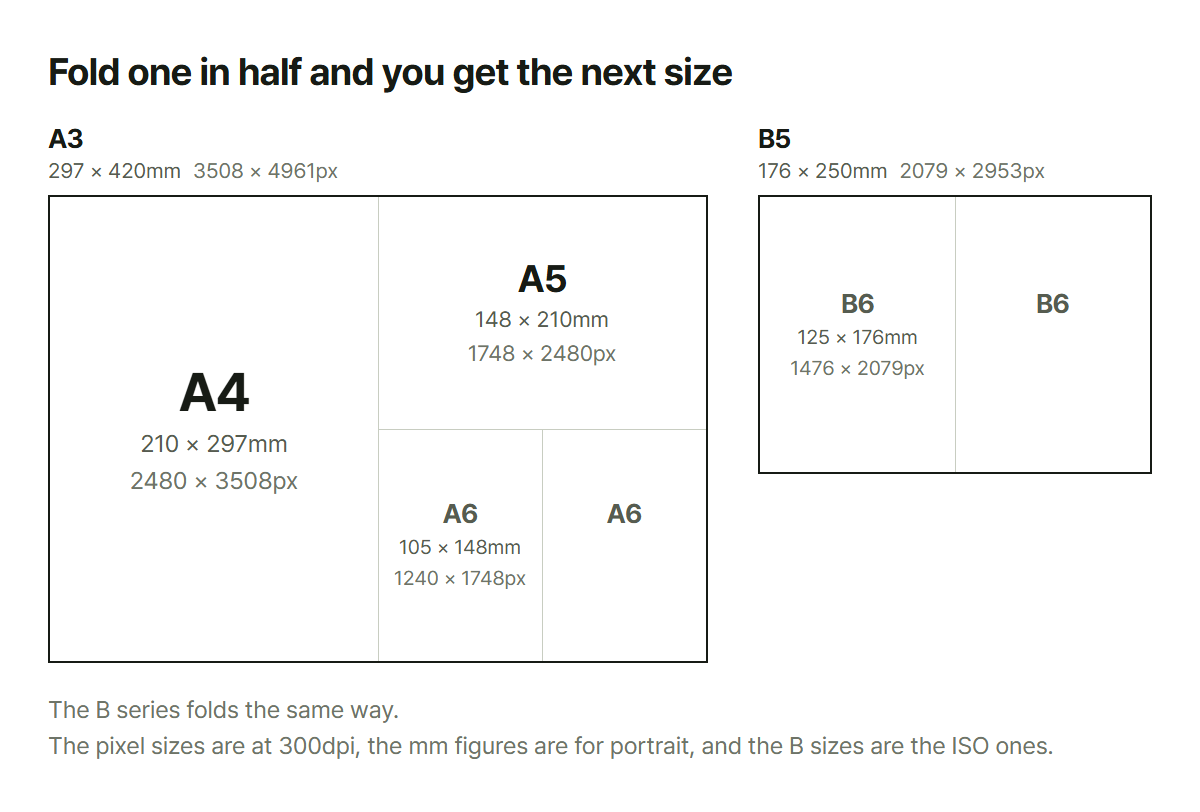
Fold an A size in half and you get the next one down. A3 folds to A4, A4 folds to A5. That is why the short edge of A4 is the same number as the long edge of A5.
Bleed: this is why text comes back trimmed off
If it is going to a print shop, build it 3mm larger on every side. For A4 that means 216×303mm, not 210×297.
Printing happens on a big sheet with several copies on it, and then a blade cuts them apart. That blade does not land in exactly the same place every time: it wanders by about a millimeter. Send artwork cut to the exact size and one edge gets a white strip while the opposite edge loses that much of your design.
So you do two things together.
- Run the background 3mm past the edge: that is the part allowed to be cut off
- Keep text 5mm inside the edge: that is the part that must not be
Almost every "half my text got trimmed" accident comes from skipping the second one.
Why not just make everything 300dpi?
You can, but you gain nothing. Screens display in pixels and ignore the dpi number entirely. An A4 at 300dpi is a 2480×3508 image: a heavy file, and if you attach it to an email the other person pays for that weight.
Going the other way cannot be undone. Build something for print at 72dpi and 595 pixels will never become 2480 later. It just blurs. If printing is even a possibility, start at 300.
What this does not cover
- US Letter and Legal. The sizes above are the ISO A and B series used in Korea, Europe and
most of the world. Letter (8.5×11in) is close to A4 but not the same, and mixing them up is how documents come out with the last line on its own page
- CMYK conversion: screen color (RGB) and print color (CMYK) cannot reach the same colors.
Anything close to fluorescent goes muddy in print
- Print shops that want something other than 3mm of bleed. Some ask for 2mm, some for 5mm. One
question before you send is faster than a reprint
- Folding, die-cutting and other finishing
The paper box turns a size and a resolution into pixel dimensions, and sets the bleed-added measurements next to them for anything headed to a printer. When all you need is a ratio to hold, a thumbnail or a banner, the aspect ratio box is the shorter route.